

Appearance
Studio
Studio is the engineering tool. It builds the screens, tags, alarms and reports that Nexus runs, and publishes them to Nexus. It installs per user, on an engineer's workstation — not on the server.
This section is an overview
The full Studio guide — the editor, tag browser, alarm and report designers — is still being written. What is here is accurate for the version named at the top of this page; installing and connecting Studio is covered in full under Installing the client software, and Build your first project walks through creating tags, building a screen and binding it, start to finish.
At a glance
| Property | Value |
|---|---|
| Installs on | An engineering workstation, per user |
| Platform | Windows 64-bit. Studio is Windows-only |
| Ships as | Its own setup program, downloaded from Nexus's Downloads page |
| Signs in with | A Raylux account with designer rights |
| Connects over | HTTPS to Nexus, port 8443 (or HTTP on 8080) |
| Certificates | Trust on first use; Studio warns if a certificate later changes |
How it fits
Screens, tags, alarms and reports are authored in Studio and published to Nexus, which serves them to operators in Spectrum. Publishing is an audited action — Nexus records which designer pushed which page, and when.
Studio opens on Studio Home, which shows a card for every Nexus instance it knows about, rather than one hard-wired connection, and three ways to start a new project. One workstation can engineer however many sites it has been given a connection to.
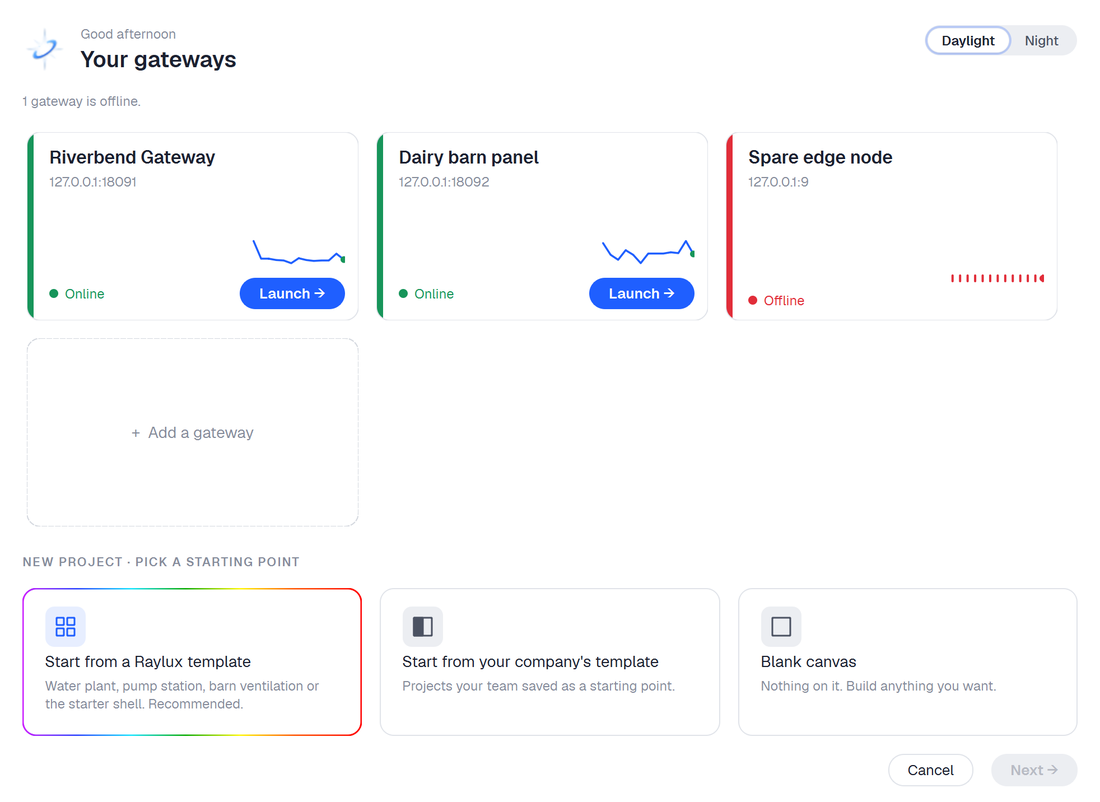 Studio Home — one card per gateway, plus Add a gateway.
Windows only, deliberately
Studio and Lens are Windows programs. A Linux install of Nexus is headless: it runs the service and serves Spectrum, and you engineer it from a Windows workstation.
Getting started
- Download and install Studio from Nexus's Downloads page.
- Connect it to Nexus and trust the certificate.
- Sign in with an account that has designer rights. The administrator created at first run has them; for day-to-day work, create a Designer account instead.